Recent blog posts

Reducing clutter in Drupal with Hide Formats, Better Formats, and Simplify

It's great having multiple text formats in Drupal so you can choose the version you need - even switching between Filtered HTML and Full HTML can be a handy option when you'd like to limit HTML tags most of the time but allow more formatting freedom on occasion.

But having the Text Format widget visible on every text field can use up a lot of screen space.

Email newsletters for small organizations

Lots of small organizations, especially non-profits, want to send out email newsletters to members and supporters. Mailchimp is probably the best-known email service, but it can be daunting for some small organizations - especially if the newsletters are being sent by volunteers who don't have the time to learn how to use all the options of a system like Mailchimp.

Buttondown is a great alternative.

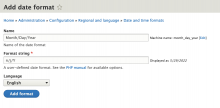
Creating a new date format in Drupal 9

I'm a little surprised that Drupal doesn't come with my favorite plain date formats by default.

I especially like and use dates without times - even for fields that store times.

Date formats are part of the Regional and language section of the Configuration features.

To create a custom date format:

Go to Configuration > Regional and language > Date and time formats

https://example.com/admin/config/regional/date-time

Click Add format

Tags

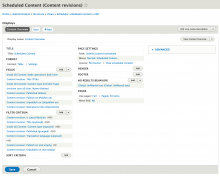
Customizing Drupal's Scheduled Content View

One of the great things about Drupal - especially recent versions, like Drupal 8 and 9 - is that so much of the administration interface is built using Views - which means it's easy to customize it.

I prefer to see Scheduled Content in the order in which it will be published - but that's not how it works out of the box.

The Scheduled Content view (found at xxx) has no Sort Criteria, and no Default Sort Order in the format's Style Options. But it's extremely easy to change that.

Favorite modules: Admin Toolbar and Admin Menu

I like to be efficient, so I make a habit of installing an admin menu module on every site I build.

These modules add a menu with all the administrative tasks for creating content, managing users, and configuring every aspect of the site, saving me time and clicks as I move around in Drupal setting things up.

For Drupal 8, I use Admin Toolbar:

Adding blocks in Drupal 8

If you're used to Drupal 7, you might have a moment of frustration the first time you try to add a block to your pages in Drupal 8.

In Drupal 8, you won't see all your unused blocks stowed in the Disabled section of the Blocks page.

Instead, new blocks are hidden until you add them to a region using Drupal 8's new Place Block button: