Drupal 9

Reducing clutter in Drupal with Hide Formats, Better Formats, and Simplify

It's great having multiple text formats in Drupal so you can choose the version you need - even switching between Filtered HTML and Full HTML can be a handy option when you'd like to limit HTML tags most of the time but allow more formatting freedom on occasion.

But having the Text Format widget visible on every text field can use up a lot of screen space.

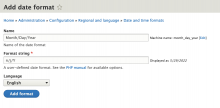
Creating a new date format in Drupal 9

I'm a little surprised that Drupal doesn't come with my favorite plain date formats by default.

I especially like and use dates without times - even for fields that store times.

Date formats are part of the Regional and language section of the Configuration features.

To create a custom date format:

Go to Configuration > Regional and language > Date and time formats

https://example.com/admin/config/regional/date-time

Click Add format

Tags

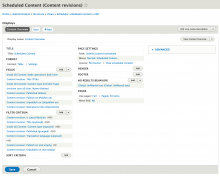
Customizing Drupal's Scheduled Content View

One of the great things about Drupal - especially recent versions, like Drupal 8 and 9 - is that so much of the administration interface is built using Views - which means it's easy to customize it.

I prefer to see Scheduled Content in the order in which it will be published - but that's not how it works out of the box.

The Scheduled Content view (found at xxx) has no Sort Criteria, and no Default Sort Order in the format's Style Options. But it's extremely easy to change that.