Fixing the Non-existent Service user.data Error

Sometimes, when upgrading or migrating a Drupal 8 or Drupal 9 site, a maddening error appears:
Sometimes, when upgrading or migrating a Drupal 8 or Drupal 9 site, a maddening error appears:
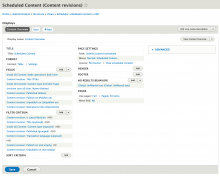
One of the great things about Drupal - especially recent versions, like Drupal 8 and 9 - is that so much of the administration interface is built using Views - which means it's easy to customize it.
I prefer to see Scheduled Content in the order in which it will be published - but that's not how it works out of the box.
The Scheduled Content view (found at xxx) has no Sort Criteria, and no Default Sort Order in the format's Style Options. But it's extremely easy to change that.
I like to be efficient, so I make a habit of installing an admin menu module on every site I build.
These modules add a menu with all the administrative tasks for creating content, managing users, and configuring every aspect of the site, saving me time and clicks as I move around in Drupal setting things up.
For Drupal 8, I use Admin Toolbar:
If you're used to Drupal 7, you might have a moment of frustration the first time you try to add a block to your pages in Drupal 8.
In Drupal 8, you won't see all your unused blocks stowed in the Disabled section of the Blocks page.
Instead, new blocks are hidden until you add them to a region using Drupal 8's new Place Block button:
It's not always easy to post regularly to your website. For smaller organizations and individual bloggers, it's often easier to write several posts every few weeks, rather than one every few days.
Drupal has a Scheduler module that makes it easy to write several new posts and schedule them to be published later.
To use Scheduler in Drupal 8: